

Example app: Sketch
Sketch is Folio's reference app. It opens PNG images from /images, lets you draw on them with a marker, previews and restores earlier versions, keeps a private edit log in a SQLite file under /app/sketch.db, and runs a background Python worker that publishes 32x32 thumbnails to /images/thumbnails/32x32/.
Walking through Sketch shows how every piece of a Folio app fits together in practice.
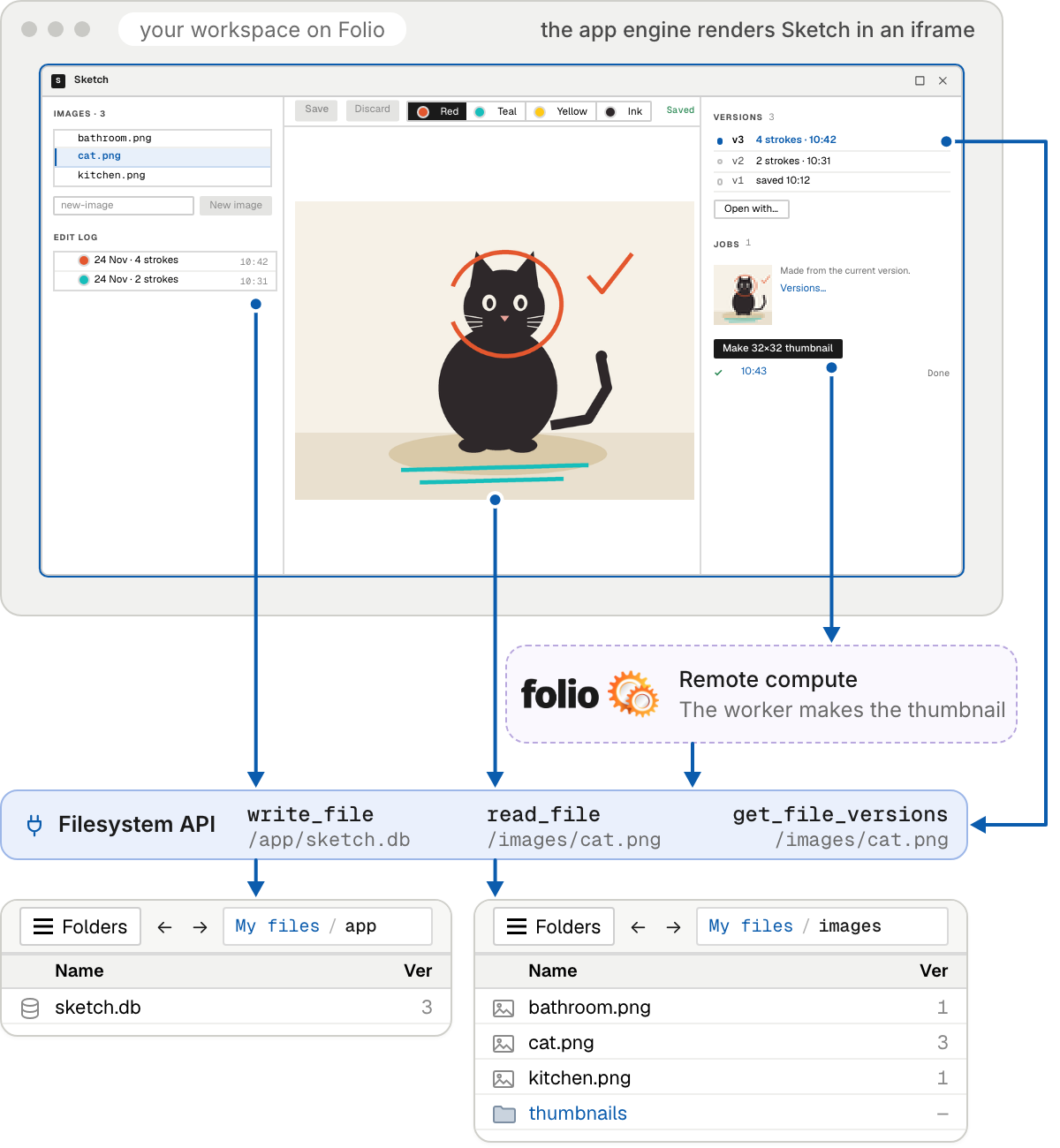
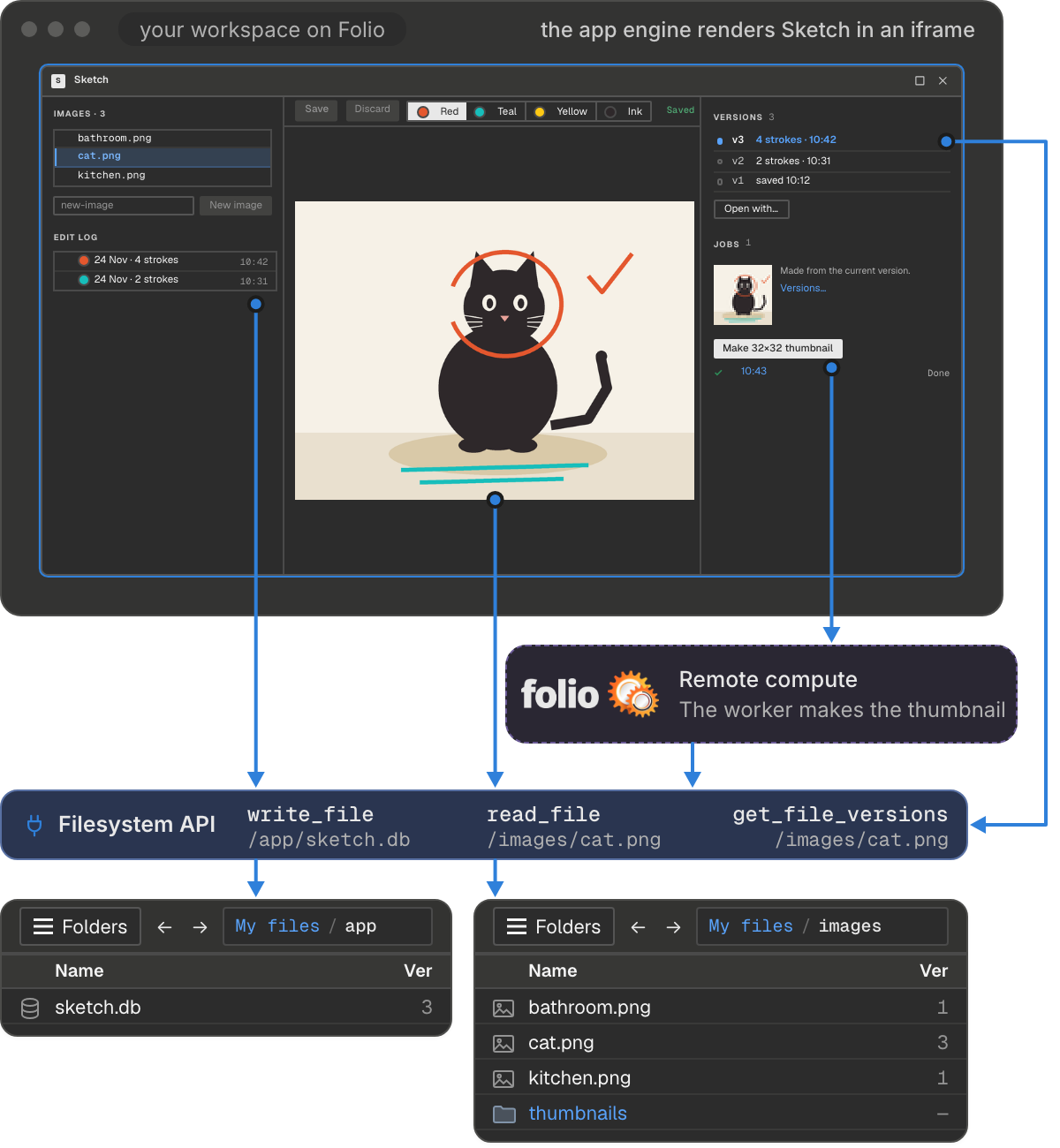
How Sketch is structured
Sketch separates its code into four clean layers so UI components stay simple and all Folio interactions live in one place:
manifest.json: declares permissions, launch locations, and background jobs.data/: the only frontend folder that imports@planar/frontend-sdk(live files, versions, jobs, and SQLite app data).model/: pure TypeScript logic (drawing state, PNG chunk handling, thumbnail paths) with no SDK imports.ui/: React components that call hooks and actions fromdata/.backend/: the Python background worker (worker.pyandresize.py).
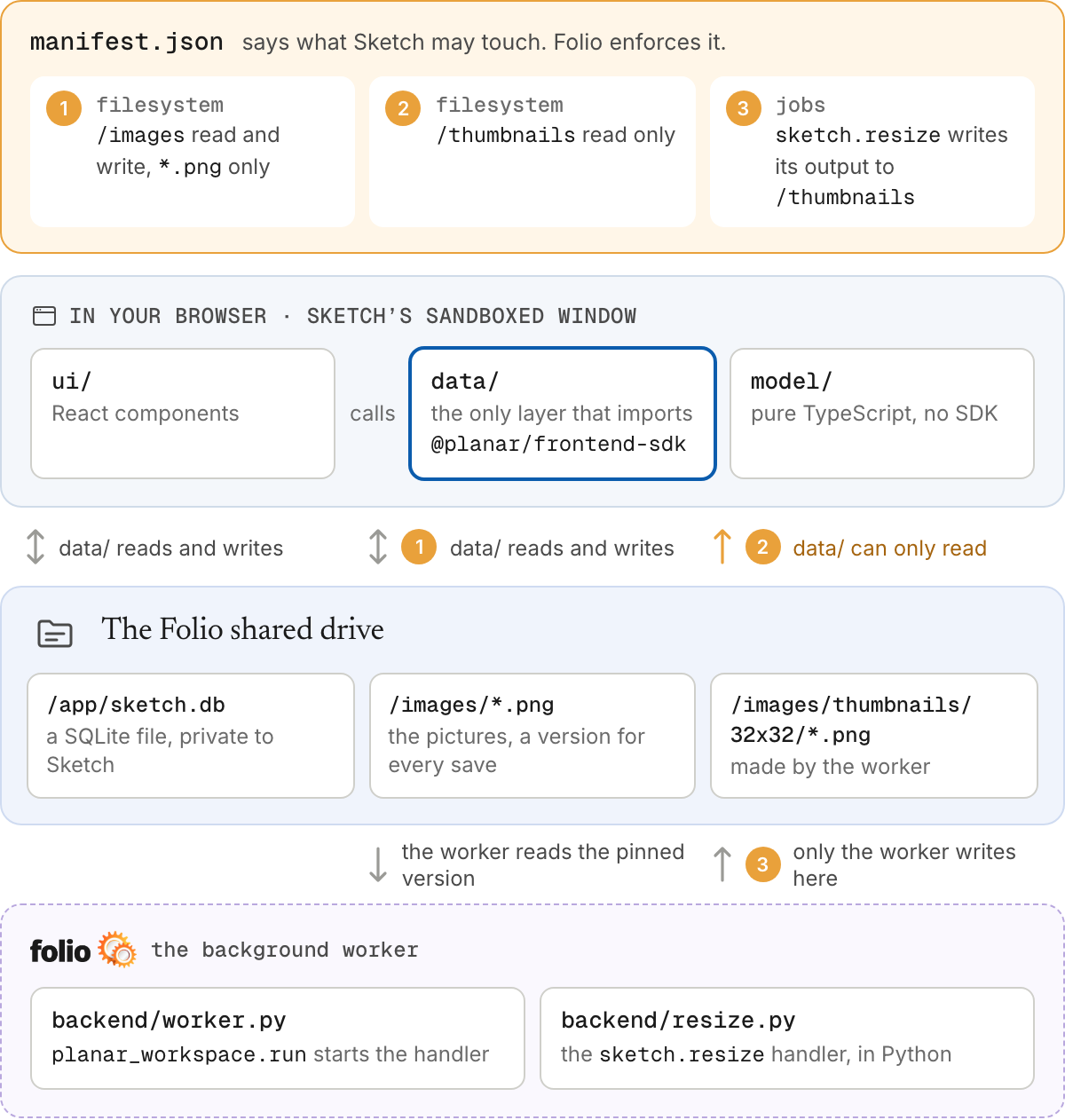
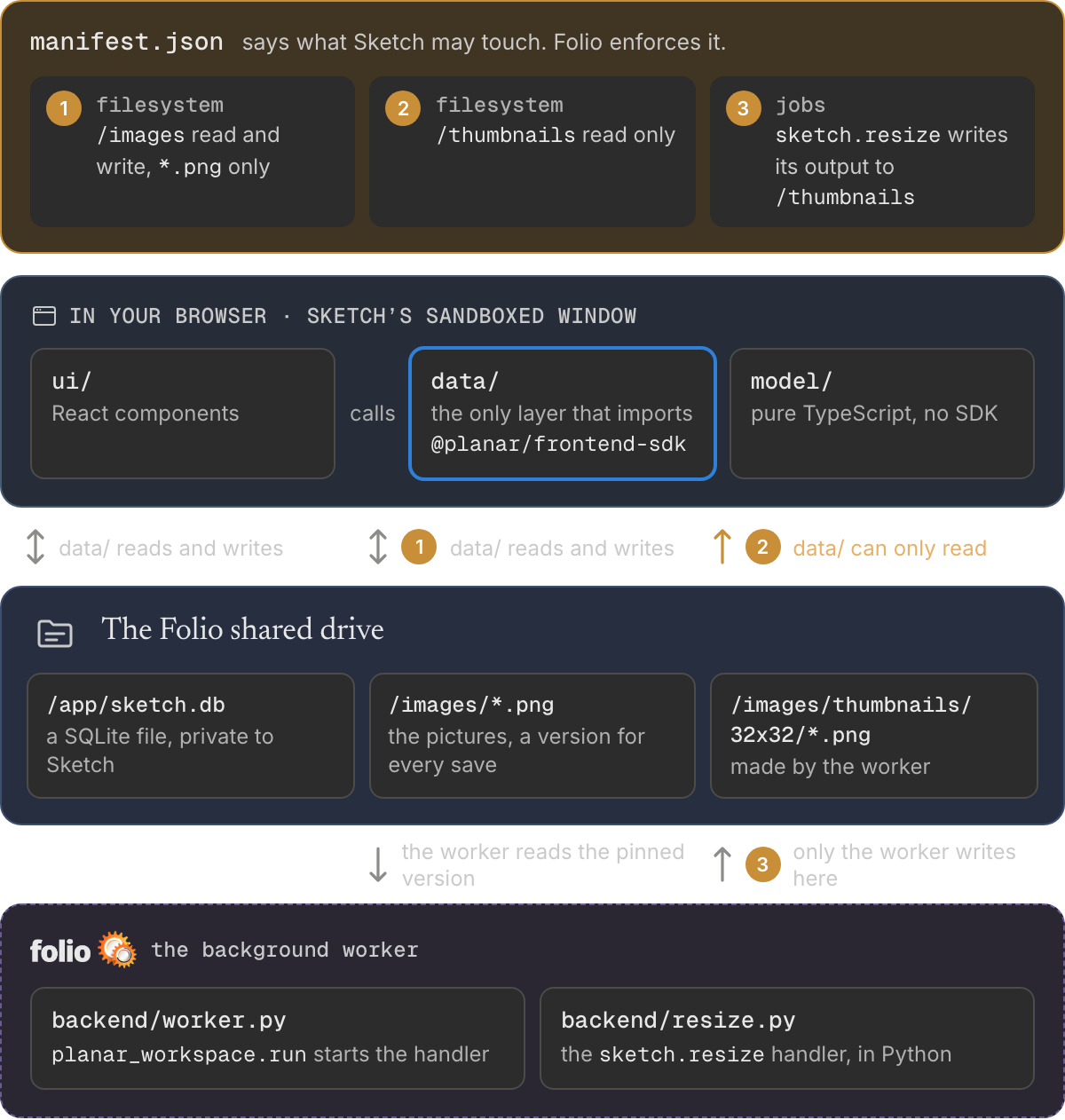
1. The manifest (manifest.json)
Everything Sketch is allowed to touch is declared up front. Notice how /images is read_write (restricted to *.png), while /thumbnails is read_only for the frontend so only the sketch.resize worker can write thumbnails:
{
  "format": "planar.application/mini-v1",
  "id": "sketch",
  "name": "Sketch",
  "version": "1.0.0",
  "runtime": {
    "frontend": "index.html",
    "worker": "backend/worker.py",
    "parametersContract": "backend-parameters.json"
  },
  "filesystem": [
    { "mount": "/images", "source": "WORKSPACE_SLOT", "path": "/images", "mode": "read_write", "writePaths": ["*.png"] },
    { "mount": "/thumbnails", "source": "WORKSPACE_SLOT", "path": "/images/thumbnails", "mode": "read_only" }
  ],
  "launchLocations": [
    { "kind": "directory", "pathPattern": "/images", "rootParents": 0 },
    { "kind": "file", "pathPattern": "/images/*.png", "rootParents": 1, "acceptedExtensions": [".png"] }
  ],
  "jobs": [
    {
      "id": "sketch.resize",
      "handler": "backend/resize.py:resize",
      "inputs": [{ "name": "image", "mount": "/images", "required": true, "slotId": "image" }],
      "outputs": [{ "name": "thumbnail", "filename": "{imageId}.png", "mediaType": "image/png", "slotId": "thumbnail-32" }],
      "outputMount": "/thumbnails",
      "outputLayout": "bound_path",
      "outputPathParameter": "thumbnailPath",
      "timeoutSeconds": 120
    }
  ]
}
2. Reading, saving, and versioning shared files (data/image.ts, data/versions.ts)
Sketch watches file metadata (useFile) to know which version is current, and reads that version's bytes (useContent). Saving writes the full PNG back to the same path and passes basedOn so Folio records which version the edit started from:
// data/image.ts (abridged)
import { fs } from '@planar/frontend-sdk/browser';
import { useContent, useFile } from '@planar/frontend-sdk/react';

export function useImage(path: string | null) {
  const file = useFile(path);
  const content = useContent(file.value);
  // Returns the current version's bytes and loading/error state
}

export async function saveImage(path: string, png: Uint8Array, basedOn: ImageVersion | null) {
  const { fileRevisionId } = await fs.writeFile(path, png, 'image/png', {
    basedOn: basedOn?.fileRevisionId ?? null,
  });
  return { fileRevisionId, bytes: png };
}
Version history, read-only previews, and restoring an older version each take one SDK call:
// data/versions.ts (abridged)
import { fs } from '@planar/frontend-sdk/browser';
import { useFileHistory } from '@planar/frontend-sdk/react';

export function useVersions(path: string | null) {
  const { loading, value, error } = useFileHistory(path);
  return { loading, error, versions: value?.revisions ?? [] };
}

export async function previewVersion(path: string, fileRevisionId: string) {
  const { bytes } = await fs.readRevision(path, fileRevisionId);
  return { fileRevisionId, bytes };
}

export async function makeCurrent(path: string, fileRevisionId: string) {
  await fs.restoreVersion(path, fileRevisionId);
}
3. Private app database as a SQLite file (data/edit-log.ts)
Sketch tracks an edit log and submitted job handles in a real SQLite database (sql.js in WebAssembly) stored in its private /app/sketch.db file. Every app automatically gets /app, isolated from other apps and persisted on the shared drive:
// data/edit-log.ts (abridged)
import initSqlJs from 'sql.js';
import { fs } from '@planar/frontend-sdk/browser';

const DB_PATH = '/app/sketch.db';

async function open() {
  const [SQL, bytes] = await Promise.all([
    initSqlJs({ locateFile: () => sqlWasm }),
    fs.readFile(DB_PATH).catch(() => null),
  ]);
  const db = bytes ? new SQL.Database(bytes) : new SQL.Database();
  db.run('CREATE TABLE IF NOT EXISTS edits (file_revision_id TEXT PRIMARY KEY, edited_at TEXT NOT NULL, stroke_count INTEGER NOT NULL, color TEXT NOT NULL)');
  db.run('CREATE TABLE IF NOT EXISTS jobs (job_id TEXT PRIMARY KEY, image_path TEXT NOT NULL, submitted_at TEXT NOT NULL)');
  return db;
}

async function persistChange(db: Database, sql: string, values: SqlValue[]) {
  db.run(sql, values);
  await fs.writeFile(DB_PATH, db.export(), 'application/vnd.sqlite3');
}
Notice that Sketch stores only the jobId handles in SQLite, never job status. Live job status always comes from Folio via useJob(jobId).
4. Background worker (data/jobs.ts, backend/worker.py, backend/resize.py)
From the frontend, submitting a background job passes paths only. Folio pins the input image to its current version at acceptance, so later edits do not affect a running job:
// data/jobs.ts (abridged)
import { jobs } from '@planar/frontend-sdk/browser';
import { useJob } from '@planar/frontend-sdk/react';

export async function submitResize(imagePath: string, thumbnailPath: string) {
  const job = await jobs.submit('sketch.resize', { thumbnailPath }, { image: imagePath });
  await recordJob({ jobId: job.jobId, imagePath, submittedAt: job.createdAt });
  return job;
}

export function useResizeJob(jobId: string) {
  return useJob(jobId);
}
On the backend, the worker entry point maps job IDs to Python handlers using planar_workspace.run:
# backend/worker.py
import planar_workspace
import resize

if __name__ == '__main__':
    planar_workspace.run({'sketch.resize': resize.resize})
The handler itself reads the pinned input file as a normal Path and writes directly to the declared output. When the with block closes, Folio seals and publishes the thumbnail as the current version of the target file, even if the user closed Sketch right after clicking the button:
# backend/resize.py (abridged)
from PIL import Image
import planar_workspace

def resize(job: planar_workspace.Job) -> None:
    with job.outputs['thumbnail'].open('wb', pin=True) as out:
        with Image.open(job.inputs['image'].path) as image:
            image.convert('RGBA').resize((32, 32), Image.Resampling.LANCZOS).save(out, format='PNG')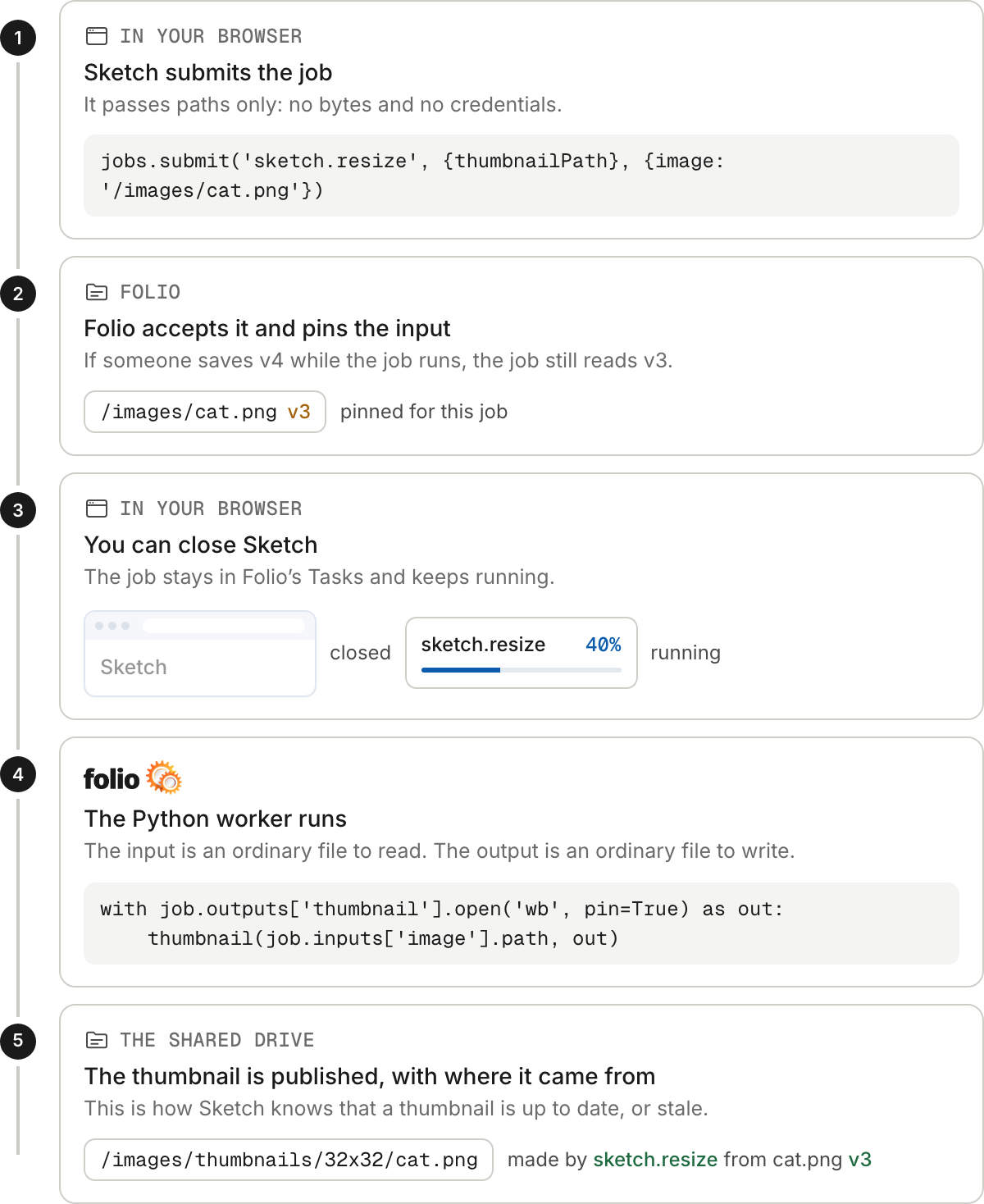
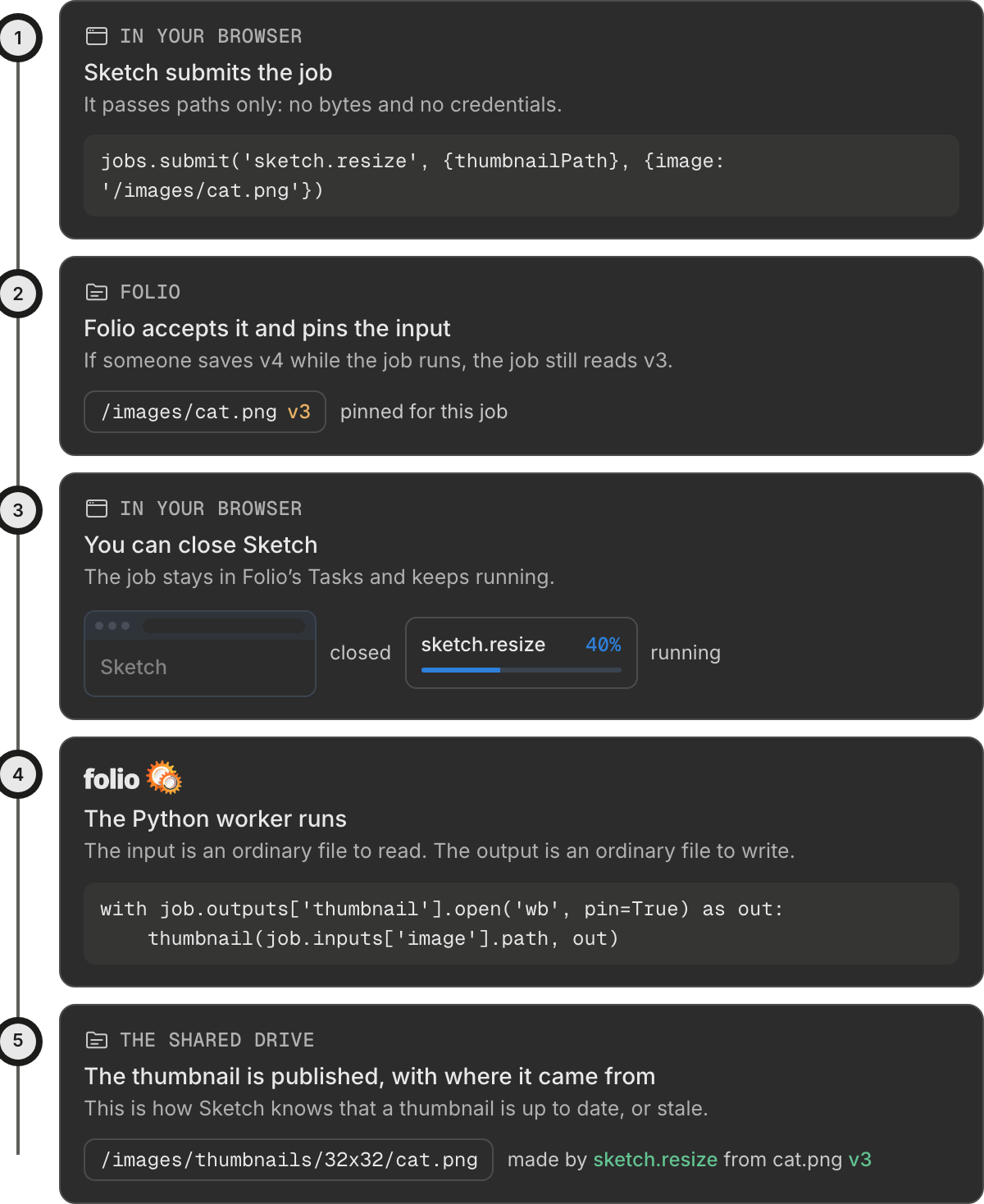
Because Folio records provenance automatically on job outputs, Sketch can compare the thumbnail's derivation against the image's current fileRevisionId to tell the user whether the thumbnail is up to date or stale.
Where to go next
- Tasks and jobs: how background jobs appear in the Tasks panel and file details.
- SDK reference: full list of
fs,jobs,entities, and React hooks. - The manifest: all supported manifest fields and app registration rules.