

App permissions
An application is allowed to modify only the data it owns, without unexpectedly changing files that other applications depend on. By enforcing these boundaries structurally rather than relying on prompts or conventions, Folio lets teams and agents build apps independently while sharing a common workspace.
The rule is simple: users define an app's access in manifest.json, and the Folio runtime enforces it on every request.
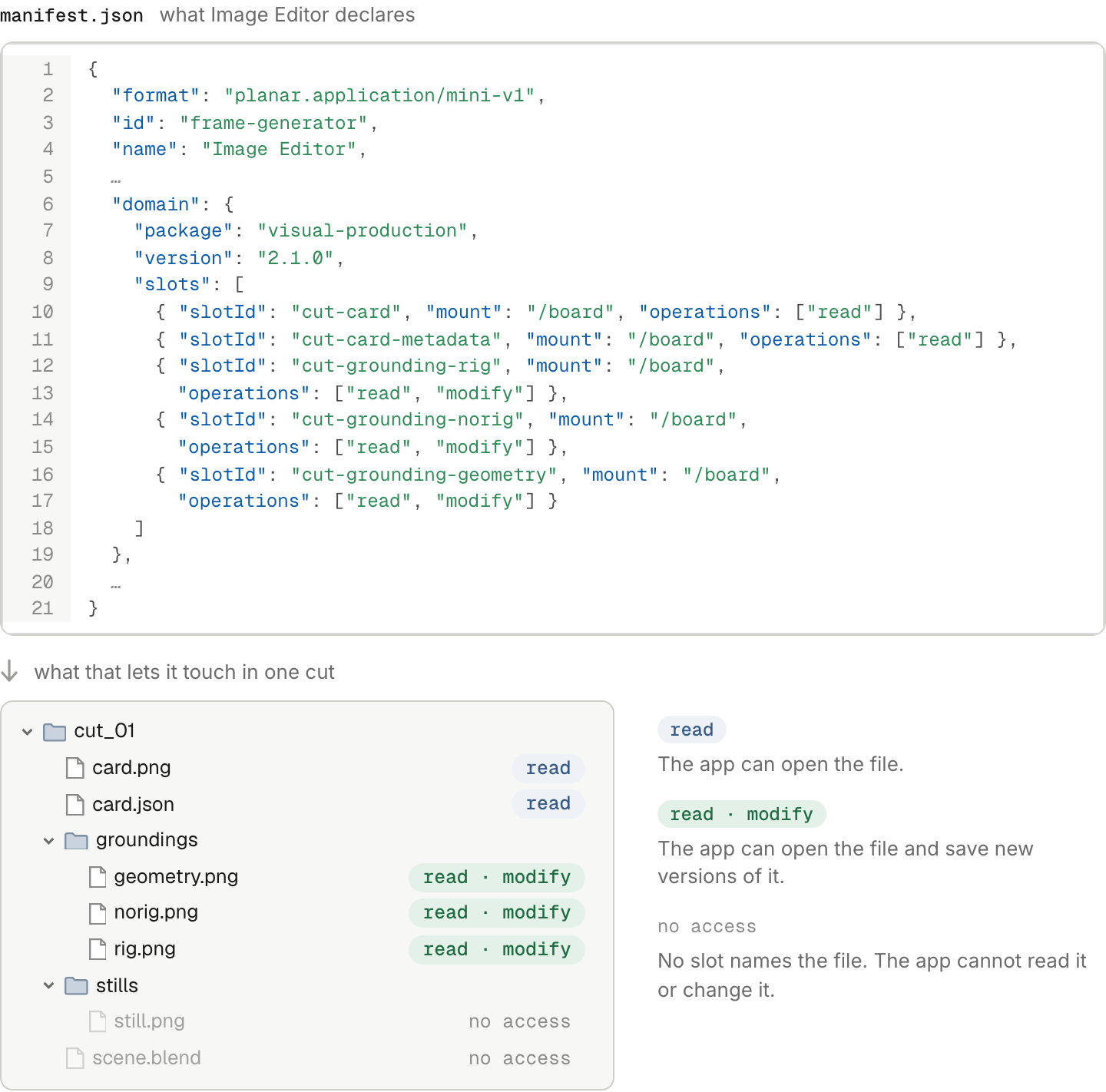
Three layers of access
An app declares everything it needs to touch in its manifest:
- Shared workspace files (
domain.slotsandfilesystem): Apps request explicitread,create, andmodifyoperations on named domain slots, or explicit folder bindings (read_only, orread_writenarrowed bywritePathssuch as*.png). Any file not declared in the manifest has no access. - Frontend vs background worker separation: A frontend mount can be
read_onlywhile a declared background job is granted write access to its specific output slot (for example, in Example: Sketch, the frontend can only read/thumbnailswhile thesketch.resizeworker publishes thumbnails there). Environment secrets declared inruntime.envare injected into the worker only and never reach browser code. - App-private storage (
/app): Every app gets an isolated/appfolder on the drive for private state or an embedded database (such as/app/sketch.db). No other app can read or write another app's/appfolder, while workspace members can still inspect/apps/<app-id>in the File Browser.
How the runtime enforces permissions
- Sandboxed iframe isolation: Every app runs inside a sandboxed iframe and never receives your sign-in cookie, mount tokens, or cloud-storage credentials.
- Ephemeral session tokens: Each time you open an app, Folio mints a short-lived session token bound to that app's registered manifest, the member who launched it (so every write is attributed to them, and the session stops immediately if that member is removed), and the active branch.
- Checked on every request: The server validates every file read, write, watch, and job submission against the registered manifest. If an app tries to read or write outside its declared paths, or attempts path traversal, the server refuses the request with
403 forbidden(orinvalidPath) and changes nothing on the drive. - Scoped worker credentials: Background workers receive short-lived, attempt-scoped grants limited to their pinned input versions and declared output paths. Those grants are revoked immediately when a job finishes, expires, or is cancelled.
Registration and changing permissions
- Validated before launch: When an app is registered, Folio checks every declared slot, path, and field against the workspace and rejects unknown fields or disallowed operations before the app can run.
- Pinned on
main: Once an app is registered onmain, Folio pins the exact versions of its files and manifest, so it cannot silently change code or widen its permissions later. Changing an app or its access requires registering a new copy (or testing it as aDrafton a branch). - Who can register: Today, any workspace member can define and register an app, and the runtime enforces its declared boundaries automatically. Dedicated admin-approval flows and interactive permission prompts for third-party apps are not enforced yet.